
Your needs, this model
Does it fit your priorities?
How are photos and videos sent to the AWFC10F?
Aluratek's page describes sending them from anywhere through its eCalendar smartphone app over an internet connection. The linked quick-start shows app-account registration, device binding and sending media; it does not document a removable-card route.
Explore this need in the finder →Can I rely on the AWFC10F to display photos without internet?
The maker requires Wi-Fi for the eCalendar workflow, but its exact page-linked guide does not clearly settle first-time setup, cached-photo playback or offline import. Do not treat 32GB of listed memory as proof of a complete offline arrangement.
Explore this need in the finder →Which family calendars and planning tools does the manufacturer describe?
The page lists Google, Apple/iCloud, Yahoo, Outlook and Cozi sync, plus profiles, reminders, tasks, meals and chores/rewards. The setup guide requires the eCalendar app/account; confirm each calendar's current permissions and sync terms before connecting personal schedules.
Explore this need in the finder →The Aluratek AWFC10F is a connected family-calendar display that also presents photos and videos. Its 10.1-inch IPS touchscreen is listed at 1280 × 800 pixels, and Aluratek describes a portrait-or-landscape stand, automatic rotation, a light sensor and 32GB of built-in memory. This assessment is based on the exact U.S. product page, its one-option product record, and the English quick-start guide linked from that page. No frame was purchased, owned, installed, measured or tested.
A calendar display first, with photos alongside
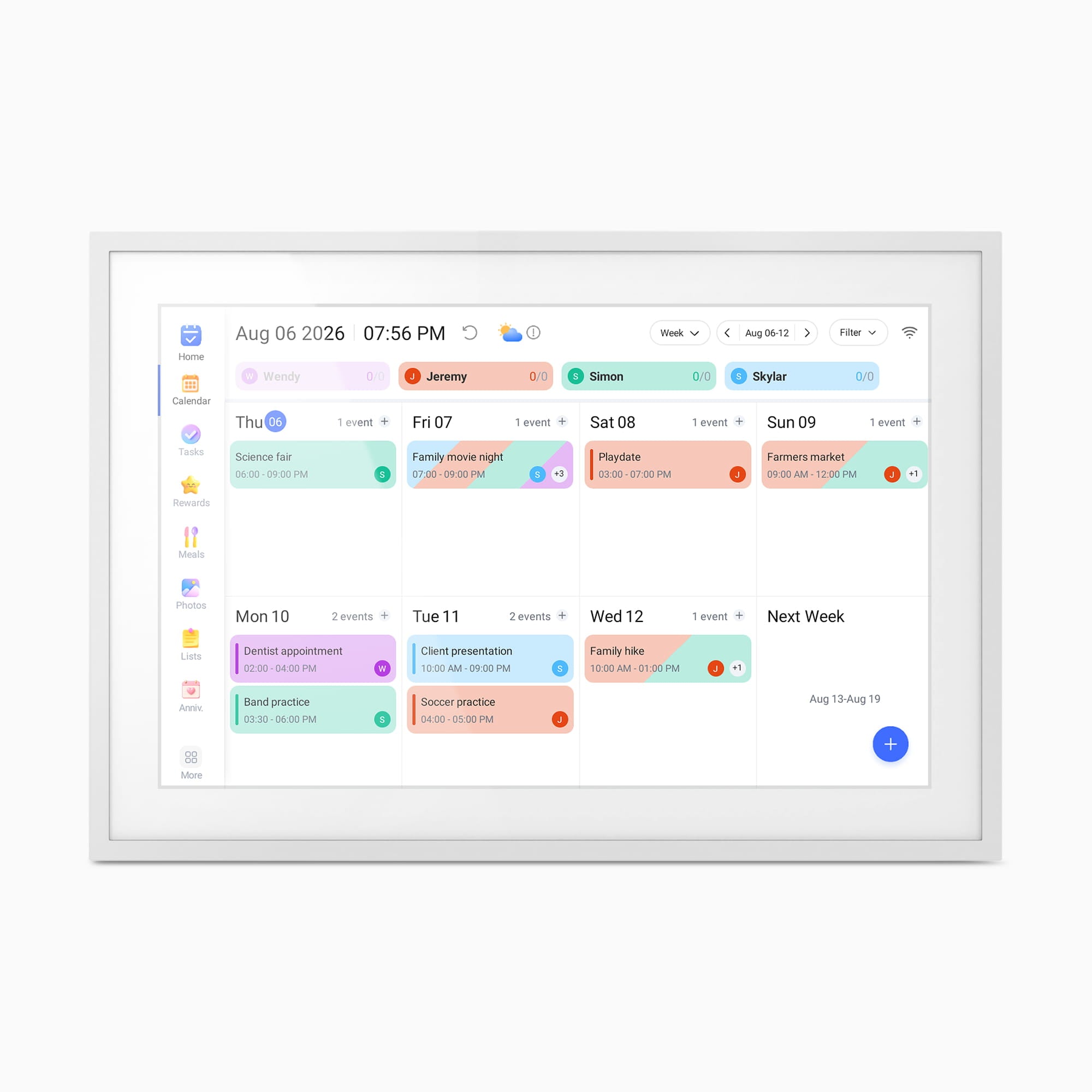
The useful distinction is that the AWFC10F is not presented simply as a photo slideshow appliance. Aluratek's page describes an eCalendar with family profiles, events and reminders, tasks, meal planning, chore tracking and rewards, plus a whiteboard and anniversary reminders. The photo section adds sending pictures and videos from the eCalendar app and playing media as a slideshow. That combination could simplify a shared kitchen or household planning spot: one always-visible screen can carry schedules and family images instead of requiring a separate calendar display and frame.
There is a tradeoff to that hybrid design. If the main goal is a large photo visible across a room, a 10.1-inch diagonal screen is a compact counter or desk scale, not a large living-room display. The listed 1280 × 800 resolution has a 16:10 shape, which is relatively wide; very tall portrait photographs may need cropping, letterboxing or a different composition. The product page says the frame supports horizontal or vertical use and automatic rotation, but the documents reviewed do not explain how each image is fitted in either position. Check the maker's current cropping controls if preserving the entire edge of a particular photo matters.
Understand the connected setup before relying on the calendar
The product-page-linked AWFC10F/AWFC15F quick-start guide specifies a stand and AC power adapter for the 10.1-inch model, then walks through Wi-Fi connection, installing the eCalendar-Daily Planner app, creating an account and binding the frame. It shows adding a device as an eCalendar, linking an eCalendar account and using a frame-specific email address for external calendars. That is a meaningful setup sequence rather than a no-account or plug-in-only photo workflow. The maker says Wi-Fi is required for the eCalendar system, so plan for an outlet and a usable network where the display will live.
Aluratek lists Google, Apple/iCloud, Yahoo, Outlook and Cozi among its calendar services. The guide gives more detail for selected paths: Google and Outlook include a one-way or two-way sync choice, while its iPhone instructions copy a public calendar share link before adding an external calendar. It also describes creating events from the app or directly on the frame. These are manufacturer-documented workflows, not a test of each provider account, permission setting or future app version. As a practical privacy inference from the guide's public-link setup, anyone with the share URL may be able to view that calendar; check the provider's sharing controls before adding a personal schedule.
Remote family media is documented; local and offline behavior is not
For photographs and videos, the quick-start guide describes selecting the eCalendar in the app, creating an album and sending media to the frame. Aluratek describes this as a way to share from anywhere, which depends on an internet-connected Wi-Fi setup. A relative who is expected to contribute remotely should be prepared for the app/account workflow and should confirm that the intended household is comfortable managing those accounts.
The product page lists 32GB of built-in memory and slideshow features, but the page and its linked quick-start do not clearly document a removable USB or card import route, the capacity available to a user, or complete playback without internet. Storage capacity alone does not establish how files are transferred or whether the frame can finish setup and continue displaying locally when disconnected. If internet-independent operation or loading photos from a memory card is essential, ask Aluratek about that exact AWFC10F use before selecting it. Do not assume that a local route shown on a different Aluratek frame applies here.
Placement, power and the exact package
The official page lists dimensions of 10.5 × 7.25 × 0.625 inches and weight of 1.6 pounds; it does not label which dimension corresponds to each axis, so use those figures as a rough fit check rather than a guaranteed orientation-specific footprint. Its light-sensor claim may be relevant on a changing-light counter, but no brightness range or response behavior was measured here. The listed kit includes a stand, adapter and quick-start guide. The linked guide illustrates the stand-and-power arrangement for the 10.1-inch version. The reviewed material does not settle whether wall mounting is supported or what hardware would be included, so confirm the exact seller's package if that is part of the plan.
Who should shortlist the AWFC10F?
Consider it when the household values a shared digital calendar and task board at least as much as a photo slideshow, wants remote photo/video contributions, can use mains power and Wi-Fi, and is comfortable with app and account setup. The listed no-subscription claim is a plus for a buyer avoiding a required recurring frame fee; it does not guarantee that internet, calendar-provider or app terms will never change. The model is less suitable as a cordless display, as a confirmed offline player, or as a purchase based on assumed USB/card compatibility. Match the exact AWFC10F code—the separately listed 15.6-inch AWFC15F is a different configuration—and verify calendar integrations, sharing permissions, placement and package contents before choosing an offer.
Aluratek AWFC10F product page · AWFC10F/AWFC15F English quick-start guide
Key specifications
Key details at a glance
| Display | 10.1-inch IPS LCD touchscreen |
|---|---|
| Display diagonal | 10.1 in |
| Aspect ratio | 16:10 |
| Supported orientations | landscape / portrait |
| Wi-Fi required | Yes |
| Wi-Fi bands listed | 2.4 GHz / 5 GHz |
| Required frame subscription | No |
| Manufacturer storage claim | Aluratek lists 32GB built-in memory, photo/video slideshow mode, integrated speakers and adjustable slideshow intervals/transitions; compatible file limits were not fully established. |
| Listed frame dimensions | 10.5 × 7.25 × 0.625 in (manufacturer dimensions; axis order not labelled) |
| Listed weight | 1.6 lb |
Use the exact model’s instructions for operating limits, supplied equipment and version differences.
Sources for this review
Sources for this assessment

Check the frame against your actual setup
Compare orientation, connection needs and placement before choosing a model.