
Your needs, this model
Does it fit your priorities?
What does the AWFC15F need for remote photo sharing?
Aluratek's page describes photo/video sharing through its eCalendar app over internet-connected Wi-Fi. The linked guide walks through Wi-Fi setup, app/account registration, binding a frame and sending media. This is a documented route, not evidence of independent service uptime or a local fallback.
Explore this need in the finder →Can the AWFC15F receive a new photo without internet?
The reviewed sources document eCalendar app sending over Wi-Fi/internet but do not establish a local USB/card import route or complete offline operation. Its listed 32GB memory is not proof that a household can load files locally or keep a slideshow running without a connection.
Explore this need in the finder →Does the AWFC15F require a recurring frame subscription?
Aluratek's exact U.S. product page says no subscription fee is required. Setup still uses an eCalendar app/account and Wi-Fi; internet, provider and future app terms are separate questions to verify.
Explore this need in the finder →The larger of Aluratek's two calendar/photo hybrids
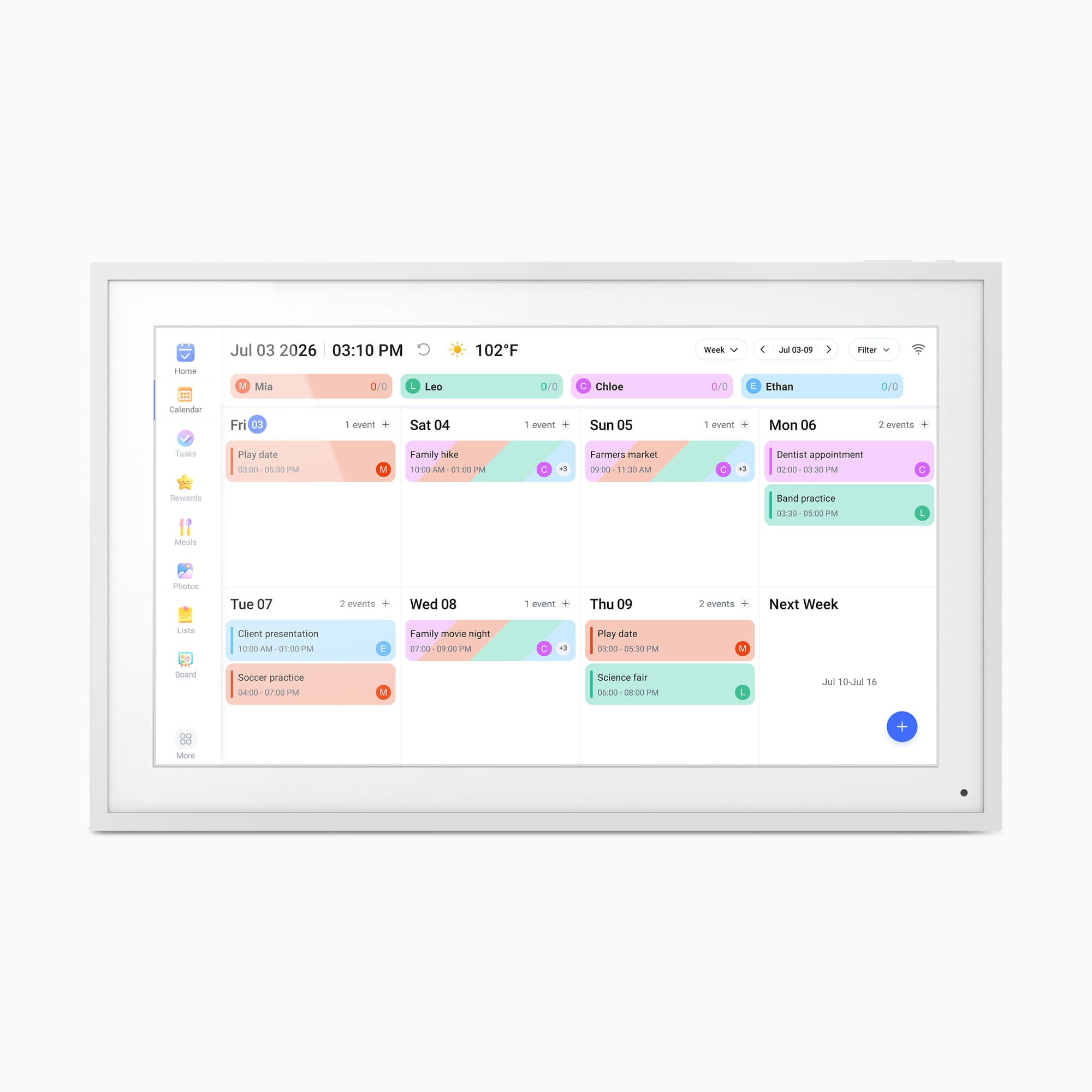
The AWFC15F is best understood as a shared household organizer with photo slideshows, rather than a conventional frame that happens to have Wi-Fi. Its 15.6-inch IPS touchscreen is specified at 1920 × 1080 in a 16:9 layout. Aluratek positions it around a family's schedule: calendar syncing, color-coded profiles, chores and rewards, task lists, meal planning and reminders share the same screen as app-sent photos and videos. It is the larger sibling of the separate 10.1-inch AWFC10F, with a correspondingly larger outside body and different stand installation.
Plan the installation before the calendar features
Aluratek lists the outside dimensions as 15.75 × 9.8 × 1 inch and the weight as 3.8 pounds. The page does not name the measurement axes, so treat that string as the maker's listed dimensions rather than a verified shelf footprint. The product page describes landscape and portrait placement and a detachable stand. In the shared AWFC10F/AWFC15F quick-start guide, the 15.6-inch model is the one that uses the supplied screwdriver to fasten the stand in a marked horizontal or vertical position. That is a useful distinction from the 10.1-inch frame's different stand setup. The same page says wall mounting is possible, but its listed package contents do not establish that a wall bracket or compatible hardware is included. Confirm the exact mount, fasteners, cable path and power outlet if wall placement is part of the plan.
The current product page identifies a 15.6-inch, 16:9 panel and 1920 × 1080 resolution. That combination offers a wide canvas for a weekly calendar view and landscape images, while many phone portraits and older 4:3 photos have a different shape. The page says media can auto-rotate and that advanced settings allow full-screen display regardless of frame orientation. Before loading a family album, check how the exact app handles edge-sensitive photos, portraits and captions. The dimensions and pixel count alone cannot promise how readable an event will be from a particular kitchen or hallway.
A connected calendar/photo workflow
The setup is deliberately networked. The exact product page lists an eCalendar smartphone app and Wi-Fi as requirements. The linked quick-start guide starts with a Wi-Fi setup, then shows installing the eCalendar-Daily Planner app, registering an account, adding a new frame and entering an activation code. For the photo side, the guide describes creating an album in the app, choosing images or videos and sending them to the frame. That is a documented remote route for a household contributor who can use the app and reach the internet; it is not proof that the service will always be available or that a local transfer works during a connection outage.
Calendar setup adds its own account and privacy decision. Aluratek lists Google, Apple/iCloud, Yahoo, Outlook and Cozi; its guide describes an iCloud public-calendar link and one-way or two-way options for Google and Outlook. The page also describes creating events on the frame or in the app, along with profiles, chores, meal planning, lists and whiteboard messages. A family should check who controls the eCalendar account, what calendar permissions a shared link exposes, which contributors can edit or add content, and what happens if the account owner changes phones or email. Keep a separate copy of valued photos rather than treating a frame's listed storage as an archival backup.
What 32GB and “no subscription” do—and do not—settle
Aluratek lists 32GB of built-in memory and photo/video slideshow support with integrated speakers. That capacity may be attractive for a mixed calendar-and-media device, but the exact product page and linked quick-start reviewed here do not identify a USB/card import workflow, user-accessible storage limit or cached-photo behavior after internet loss. I therefore would not choose the AWFC15F for a hard offline requirement based only on its memory claim. The sources also do not verify an anti-glare treatment, so a bright window or reflective kitchen should prompt a placement check rather than an assumption.
The maker says no subscription fees are required for the calendar features. That answers a recurring frame-fee concern, not whether the frame needs Wi-Fi, an eCalendar account, an internet connection for remote photos or the permissions of an outside calendar provider. The no-fee claim is dated product information, not a promise about future app or provider terms. If the screen is meant to be simple for a recipient, decide in advance who will install the app, pair the frame, connect the household calendar and help with account recovery.
Who should shortlist it
Consider the AWFC15F when an always-visible, larger shared calendar is the primary job and photo/video display is a useful second role; the family can supply mains power and stable Wi-Fi, accepts app/account setup and wants the listed no-required-subscription arrangement. Its documented landscape and portrait stand positions give more placement flexibility than a landscape-only panel, but they are alternative physical installations rather than simultaneous orientations. The 15.6-inch diagonal clears a 15.5-inch minimum and falls short of a 16-inch minimum; compare the maker's figure to the room and reading distance, then measure the outside body and stand separately.
Look elsewhere if the hard requirement is cordless placement, a maker-confirmed local USB/card route, new photo delivery without internet, known offline playback, or an anti-glare surface. Those points are not established for this AWFC15F by the exact page and shared guide. If the calendar-photo combination is appealing, compare the smaller AWFC10F as a separate model rather than treating the two as one size configuration: the screens and stand-installation steps differ. The photographed white bezel is a promotional rendering, not evidence of a delivered finish or a seller's package. Check that the listing says AWFC15F, confirm the stand/power adapter and any wall hardware for the exact offer, and review the seller's condition, warranty, return and account terms. This is a source-based assessment; no hands-on use or offline test is claimed.
Key specifications
Key details at a glance
| Display | 15.6-inch IPS LCD touchscreen |
|---|---|
| Display diagonal | 15.6 in |
| Aspect ratio | 16:9 |
| Supported orientations | landscape / portrait |
| Wi-Fi required | Yes |
| Wi-Fi bands listed | 2.4 GHz / 5 GHz |
| Required frame subscription | No |
| Manufacturer storage claim | Aluratek lists 32GB built-in memory, photo/video slideshow mode, integrated speakers and adjustable slideshow intervals/transitions; compatible file limits and the user import path are not established by the reviewed sources. |
| Listed frame dimensions | 15.75 × 9.8 × 1 in (40 × 24.9 × 2.5 cm; manufacturer lists figures without naming axis order) |
| Listed weight | 3.8 lb |
Use the exact model’s instructions for operating limits, supplied equipment and version differences.
Sources for this review
Sources for this assessment

Check the frame against your actual setup
Compare orientation, connection needs and placement before choosing a model.