
Your needs, this model
Does it fit your priorities?
Will the AWFC21F meet a 20-inch minimum display diagonal?
Aluratek lists the AWFC21F's touchscreen at 21.5 inches, so its documented diagonal clears a 20-inch finder threshold. The outside measurements and viewing distance are separate placement questions; the diagonal is not a readability guarantee.
Explore this need in the finder →Can the AWFC21F receive a new local photo without internet?
The exact product page and linked quick-start document Wi-Fi setup and app/account delivery of photos and videos, but they do not establish USB/card import or a complete offline operating route. The listed 32GB built-in memory alone is not evidence of local access; this model should not be relied on for an essential internet-independent update requirement.
Explore this need in the finder →What calendar workflow does the AWFC21F document?
The maker lists Google, Apple/iCloud, Yahoo, Outlook and Cozi, while its shared English guide describes an eCalendar account, a unique email address for the frame and activation-code pairing. The guide gives one-way or two-way examples for Google and Outlook, an iCloud public-link workflow, and event entry on the frame; these are documented routes, not tested compatibility guarantees.
Explore this need in the finder →The Aluratek AWFC21F is a distinct 21.5-inch calendar-and-photo hybrid, not a larger-screen setting on the AWFC15F. Its U.S. product page names the model and an English quick-start identifies the 10.1-, 15.6- and 21.5-inch models separately. The attraction is a shared household planner that can also show photos and videos sent through the maker's connected app—a different task from choosing a small frame mainly for a slideshow.
A very large touchscreen changes the room and the task
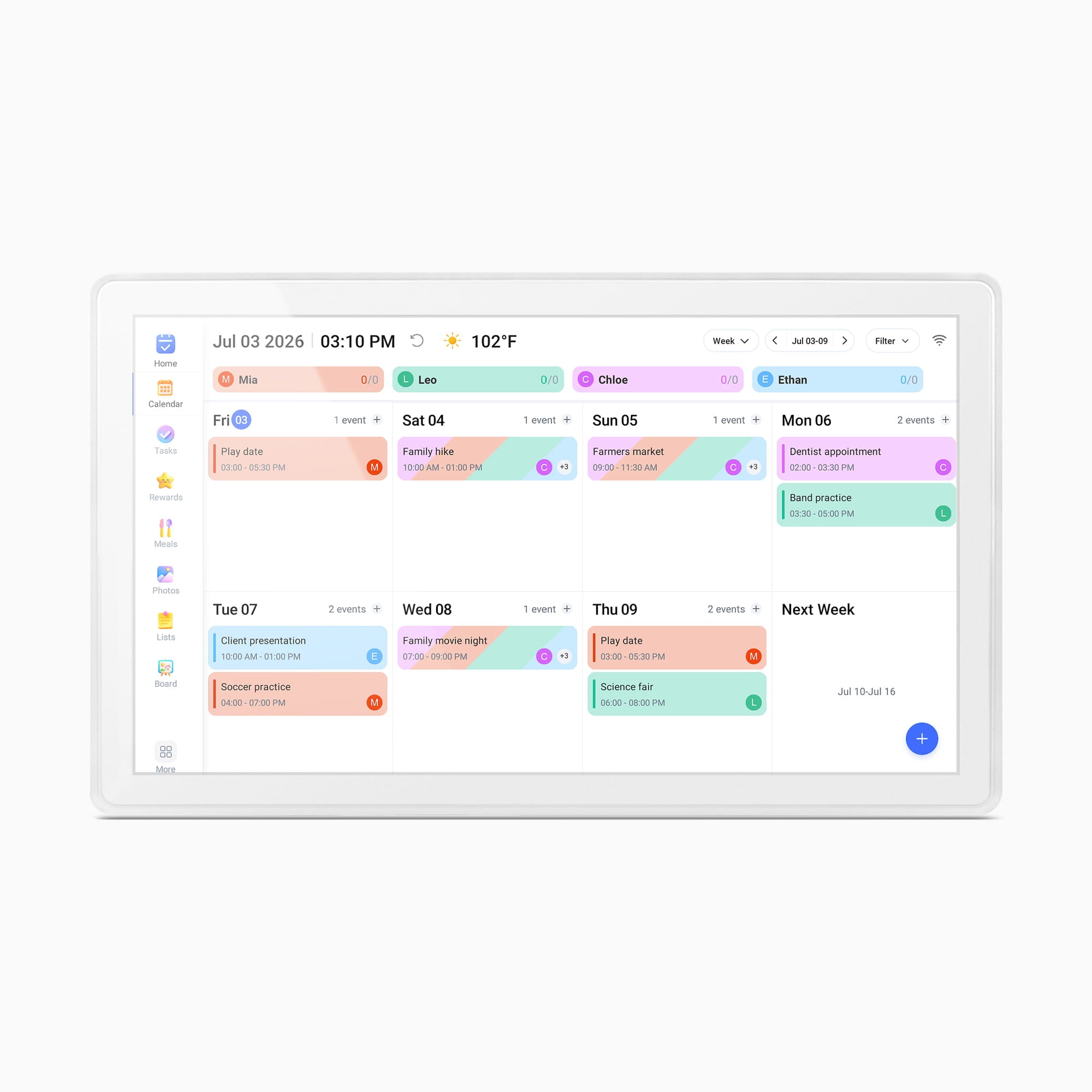
Aluratek lists a 21.5-inch IPS touchscreen with 1920 × 1080 resolution and a 16:9 aspect ratio. This is substantially larger than AWFC15F's 15.6 inches and AWFC10F's 10.1, but does not promise legible calendar text at any distance. Treat it as a screen for a deliberate shared location—a kitchen wall or broad counter where several people can approach it. The product image is a white-bezel weekly-planner rendering, not a delivered-unit photograph or viewing-quality test.
The page also lists 32GB of built-in memory, photo/video slideshows, speakers and adjustable intervals and transitions. It does not explain USB/card import, owner-usable capacity or outage playback. Storage capacity alone is not evidence of a local/offline photo route.
Calendar features are the distinguishing workflow
The AWFC21F is meant to do more than cycle through images. Its eCalendar app workflow adds family profiles and color-coded schedules, with the maker listing Google, Apple/iCloud, Yahoo, Outlook and Cozi calendars. The product page describes tasks, chores and rewards, meals, shopping lists, whiteboard messages and reminders. The shared English quick-start is more specific about setup: choose a language, connect the frame to Wi-Fi, set a time zone and city, install eCalendar-Daily Planner, register an app account, then create a unique email address for the frame and enter an activation code. Google and Outlook examples offer one-way or two-way synchronization; its iCloud example uses a public calendar link. The guide also documents creating events on the frame itself.
The instructions make setup concrete, but they are maker documentation, not compatibility tests. Decide who owns the app account and manages calendar permissions before sharing household schedules. Aluratek's no-subscription claim does not remove Wi-Fi, internet, registration, provider permissions or future service-term uncertainty.
Stand and wall placement need an exact-package check
The English guide says the 21.5-inch model props up on its metal stand in horizontal or vertical orientation and connects to its rear power port. The product page describes auto-rotation for portrait or landscape placement and wall mounting. Its product details and FAQ say a wall-mounting kit or bracket and hardware are included, while the visible box list names the stand, power adapter and quick-start and the guide's package checklist does not list wall hardware. Because the published package descriptions are not fully aligned, confirm the actual bracket, fasteners and mounting instructions for the seller's exact package if wall mounting is essential. Do not assume the 15.6-inch model's screw-in stand arrangement applies to this one; the shared quick-start gives the AWFC15F a separate screwdriver step.
The listed weight is 6.8 pounds and dimensions are 20.5 × 12.375 × 1.25 inches, with no axis order stated. Treat these as a footprint warning, not a width/height/depth plan. Check wall or shelf space, stand clearance, outlet reach and viewing height. The adapter/guide describe a mains-powered, not cordless, arrangement.
What the connected photo route does not prove
For photo sharing, Aluratek describes sending pictures and videos through its eCalendar smartphone app over internet-connected Wi-Fi, including remote sharing from elsewhere. The product page lists dual-band 2.4/5 GHz Wi-Fi and says Wi-Fi is required. That gives a documented route for online contributions, but not a local card-import route or complete offline operation. The FAQ's statement that new photos can be sent from a smartphone should not be stretched into a claim that a local file can be added during an internet outage.
No anti-glare claim appears in the reviewed material. The aspect ratio, diagonal and light sensor do not settle reflections or viewing from across a room. A specified anti-glare surface, cordless power, offline updates, confirmed wall hardware or a particular bezel finish needs exact-model evidence beyond this record.
Who should compare it—and what to verify
This model is most relevant to a household that wants a shared planning surface and a remote photo display in one sizeable, powered location, and can live with an app/account and internet-based sharing setup. A conventional photo frame is the simpler comparison when schedules, touch entry and family task lists are not important. The smaller AWFC10F and AWFC15F are separate hybrids with different screen diagonals and stand instructions, not interchangeable variants of this SKU. For a narrow shelf, portable placement or offline updates, compare the exact alternative's real operating plan rather than assuming that features carry across the Aluratek family.
Before ordering, match the AWFC21F model code, check the seller's included adapter and stand, resolve the wall-mount-kit discrepancy if needed, confirm Wi-Fi coverage and app availability on the household's phones, and review calendar-provider permissions and current account terms. The sources support an evidence-based assessment of the listed configuration; they do not establish test results, delivered contents, service uptime, current price or a guarantee that an individual seller's package is identical.
Key specifications
Key details at a glance
| Display | 21.5-inch IPS LCD touchscreen |
|---|---|
| Display diagonal | 21.5 in |
| Aspect ratio | 16:9 |
| Supported orientations | landscape / portrait |
| Wi-Fi required | Yes |
| Wi-Fi bands listed | 2.4 GHz / 5 GHz |
| Required frame subscription | No |
| Manufacturer storage claim | Aluratek lists 32GB built-in memory, photo/video slideshow mode, integrated speakers and selectable slideshow interval/transition effects; compatible file limits, local import and offline playback are not established. |
| Listed frame dimensions | 20.5 × 12.375 × 1.25 in (52 × 31.4 × 3.2 cm; manufacturer lists figures without naming axis order) |
| Listed weight | 6.8 lb |
Use the exact model’s instructions for operating limits, supplied equipment and version differences.
Sources for this review
Sources for this assessment

Check the frame against your actual setup
Compare orientation, connection needs and placement before choosing a model.